

What it’s for
The Sentinel API lets your own systems run checks without anyone opening the dashboard. Your core banking or onboarding app sends a request, and Sentinel returns a reference you use to fetch the result. This guide covers what every integration needs first: API keys and their scopes, test mode, the IP allowlist, rate limits and error responses. It ends with your first call, an AML screening (AML: anti-money laundering, here a check of a name against sanctions, PEP and watch lists). Every request goes to your Sentinel API address, which for most organizations ishttps://robust-parakeet-542.convex.site. Your address is at the top of API Keys, under API address, with a copy button. All paths start with /v1/. The same panel links to the OpenAPI spec and Postman collection; see API reference, OpenAPI and Postman.
Who can use it
- Admin and Developer can create, edit, rotate and revoke API keys.
- Reviewer, Analyst and Viewer / Auditor can see the keys by prefix only. The page tells them “Only Admins and Developers can create, rotate or revoke keys.”
- Only an Admin can change the IP allowlist in Settings → Security. See A6 Security and single sign-on (in Sentinel’s in-app Help).
- Your code acts as your organization, not as a person. A key can do whatever its scopes allow, whoever created it.
Step by step
Create a test key
- Click API Keys in the sidebar, under Developer. The same panel is in Settings → Developers.
- Click New key.
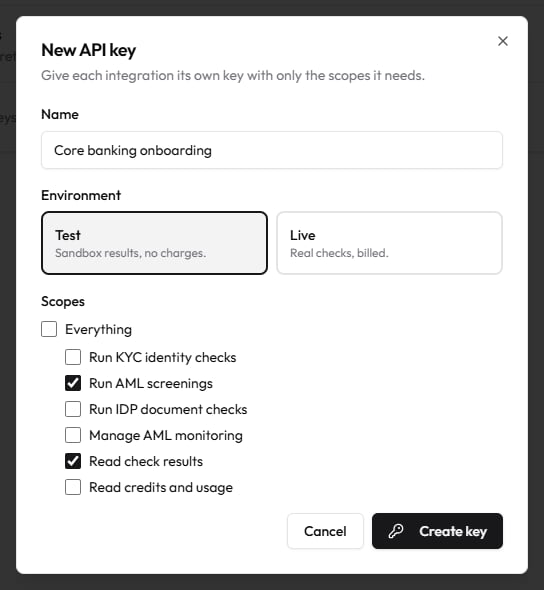
- In Name, describe the integration, for example “Core banking onboarding”. Names are up to 60 characters.
- Under Environment, choose Test (“Sandbox results, no charges.”) or Live (“Real checks, billed.”). New keys start on Test.
- Under Scopes, leave Everything ticked, or untick it and choose only what this integration needs. For your first call, Run AML screenings and Read check results are enough.
- Click Create key.
- The Your new API key box shows the full key once. Copy it into your secrets manager, tick I’ve copied and stored this key., then click Done. Sentinel stores only a hash of the key, so nobody can show it to you again.
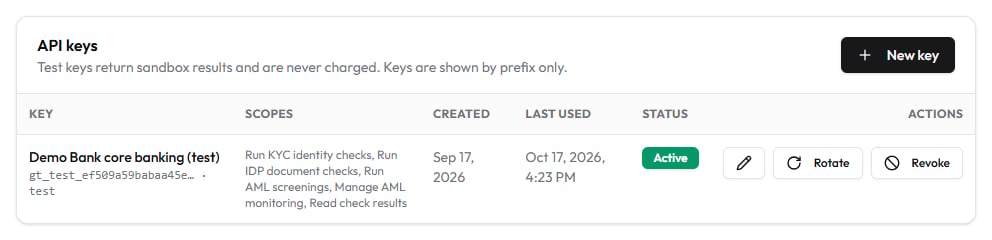
gt_test_ or gt_live_, followed by two blocks of letters and digits. The table shows each key by its prefix, its scopes, when it was created and last used, and its status.
Store the key in your environment
Keep the key out of your code. The examples below read it from an environment variable calledSENTINEL_API_KEY.
Authorization: Bearer <your key>. Request bodies are JSON, so also send Content-Type: application/json.
Run your first AML screening
POST /v1/verify/aml needs the Run AML screenings scope. Only subjectName and entityType (individual or entity) are required. AML and monitoring API lists the optional fields.
curl
Node (built-in fetch, Node 18+)
Python (requests)
202. With a test key the check is already finished:
status is queued and there is no verdict yet. Keep the id.
Fetch the result
GET /v1/verify/{id} needs the Read check results scope. You can poll it, or let Sentinel call you when the check finishes. See Webhooks.
curl
Node (built-in fetch, Node 18+)
Python (requests)
screening object with the reason, the sources screened and any matches. Results and credits explains every field.
Rotate or revoke a key
- On API Keys, find the key and click Rotate. You get a new key straight away, with the same name, environment and scopes. The old key keeps working for 24 hours, so deploy the new one first.
- To stop a key at once, click Revoke. Requests with it fail immediately.
- To change a key’s name or scopes, click the pencil button. Scope changes apply to the next request.
Limit API calls to your servers (optional)
- An Admin opens Settings → Security → IP allowlist and adds your servers’ outbound addresses, one IPv4 or IPv6 address or CIDR range per line.
- Turn on Apply to API requests too, then save. Calls from any other address now get
403.
What each result means
Scopes
A key with Everything can call every route. Note that
POST /v1/transactions needs Manage AML monitoring.
Test mode
Rate limits
Each key has a per-minute limit set by your plan. The burst is how many requests it can send at once before the per-minute rate applies.
Your organization also has a per-minute cap across all its keys, agreed with Deeptrack (30 on a new trial). Separately, an address that sends 20 failed authentications in a minute is blocked for a short time. When any limit is hit you get
429 with a Retry-After header in seconds.
Status codes and errors
Errors are JSON with anerror message. Validation errors also include details, which describes each field.
Common questions
Does test mode cost anything?
No. Test keys are never charged, and they work even when your balance is zero.Is my test data kept?
The names, ID numbers and images you send with a test key are not stored. Sentinel keeps a small sandbox record with the check’sid, so you can test fetching results and webhooks.
Can one key work in both test and live?
No. You choose the environment when you create the key, and it can’t be changed. Create one key of each.I lost a key. Can you show it again?
No. Only a hash is stored. Rotate the key, or create a new one and revoke the old one.Why did a working key suddenly return 401?
It was revoked, or it was rotated more than 24 hours ago. Check its status on API Keys.How do I see my credit balance and prices from code?
CallGET /v1/credits with a key that has Read credits and usage. See Results and credits.
Related guides
- KYC API
- Documents API
- AML and monitoring API
- Transactions API
- Results and credits
- Webhooks
- KYB and capture links API
- API reference, OpenAPI and Postman
- A5 Team members and roles (in Sentinel’s in-app Help)
- A6 Security and single sign-on (in Sentinel’s in-app Help)