

What it’s for
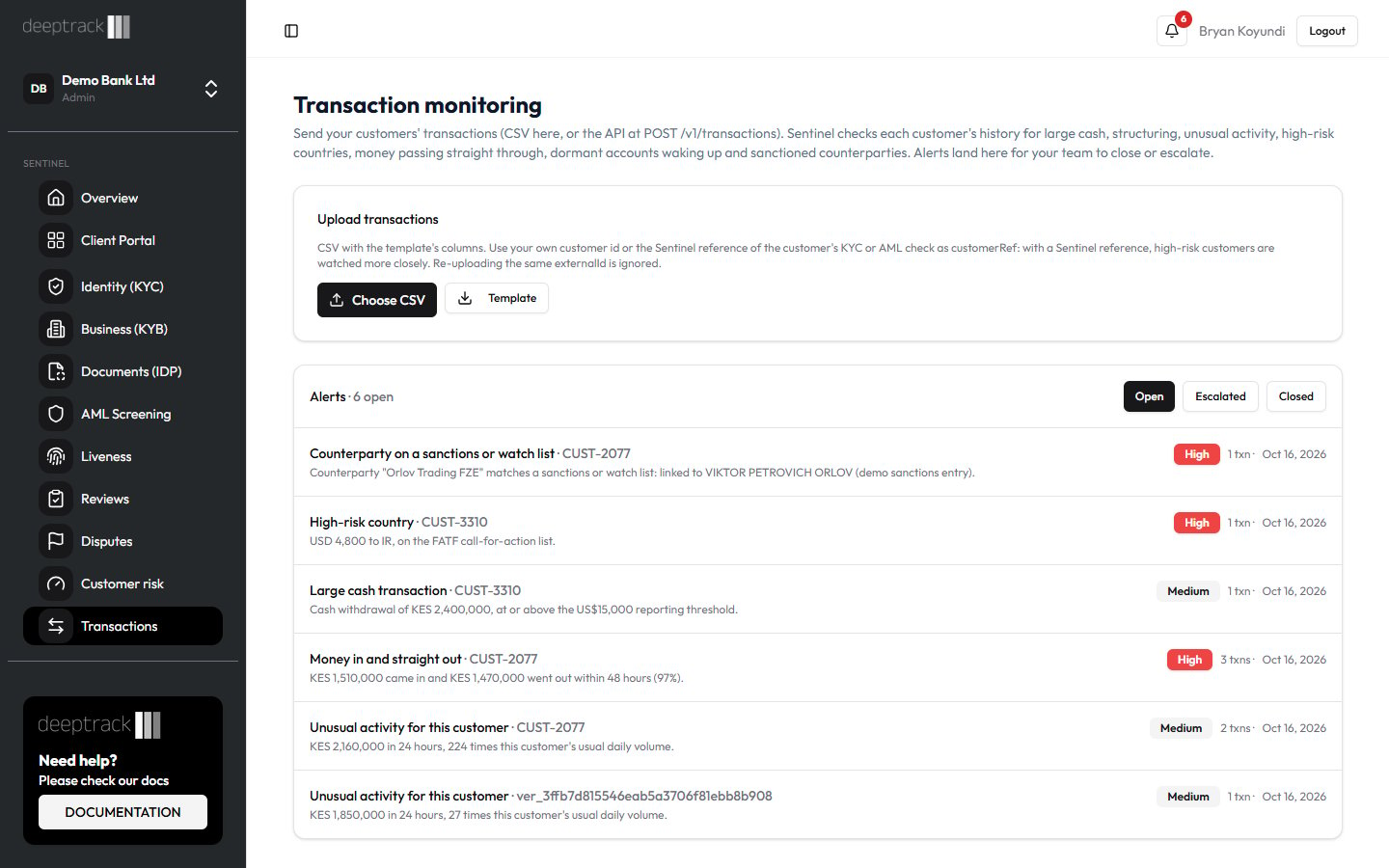
POST /v1/transactions feeds transaction monitoring from your core banking system, wallet or M-Pesa integration. Each transaction you send is stored, checked against the customer’s history by the monitoring rules, and its counterparty (the person or business on the other side of the payment) is screened against sanctions and watch lists. When a rule is met, an alert appears on the Transactions page for your compliance team. The rules and how alerts are worked are in B13 Transaction monitoring (in Sentinel’s in-app Help).
The API does the same job as the CSV upload on the Transactions page, with the same fields and the same checks. Use it to send transactions automatically, for example every few minutes or at the end of each day.
Transaction monitoring does not use credits.
Authentication, test mode, rate limits and the general error format are in Quick start.
Who can use it
- Any system holding a valid API key for your organization with the Manage AML monitoring scope. The same scope covers the monitoring calls in AML and monitoring API.
- An Admin or Developer creates keys and picks their scopes on the API Keys page.
- A key created before scopes existed can call every endpoint.
- Your organization must be on the Business or Enterprise plan, or on the free trial. On Starter and Growth, every call, test keys included, is refused with
403. - The alerts your transactions raise are seen and decided in Sentinel, not through the API. See B13 (in Sentinel’s in-app Help) for who can close or escalate them.
Step by step
All examples read the key from theSENTINEL_API_KEY environment variable, for example gt_live_.... The examples use Sentinel’s production address, https://robust-parakeet-542.convex.site. If API Keys shows a different API address for your organization, use that.
Send a batch
- Collect up to 500 transactions. They can belong to many customers.
- Give each one an
externalIdthat never changes, such as the M-Pesa receipt number or your core banking transaction id. - Set
customerRef. Where you can, use the Sentinel reference (ver_...) of the customer’s KYC or AML check. Sentinel then knows the customer’s risk rating, applies stricter thresholds to high-risk customers, and links the alert to the check. - Send them in one request as
{ "transactions": [...] }.
curl
Node
Python
Send more than 500
Split the list into chunks of 500 and send them one after another. If a request fails part-way, for example on a timeout or a 429, send the same chunk again. Rows that were already stored are counted asduplicates and skipped.
curl
This splits a JSON array file into chunks of 500 with jq, then posts each one.Node
Python
Check the outcome
- Read
accepted,duplicatesandrejectedin the response. - Fix each rejected row using its
errorand send those rows again. Theindexis the row’s position in the array you sent, starting at 0. - Open Transactions in Sentinel. New alerts usually appear within a minute.
Try it with a test key
Send the same request with a test key (gt_test_...). Sentinel checks every row and returns the same counts with "sandbox": true, but stores nothing and raises no alerts. Use it to check your field mapping before you go live.
What each result means
Transaction fields
Other fields in a transaction are ignored. Only
cash counts as cash for the large cash rule. cash and mpesa both count for the structuring rule (B13 (in Sentinel’s in-app Help)).
Response (202)
A 202 means the batch was read, even if some rows were rejected. Always check
rejected.
Row errors
Request errors
Common questions
Is it safe to send the same batch twice?
Yes. Sentinel keeps one transaction perexternalId in your organization, so a resend only increases duplicates. A resend can’t change a stored transaction. To correct one, use a new externalId.
Do test-key transactions show up in Sentinel?
No. A test key only checks the rows. Nothing is stored, no rules run and no counterparties are screened.How quickly are alerts raised?
The rules run straight after each batch, and new alerts usually appear on the Transactions page within a minute. Counterparties are screened 20 at a time, so a batch with many new names can take a few minutes. Each name’s result is reused for 30 days.Can I read alerts or decisions through the API?
No. There is no API call or webhook for transaction alerts. Your team sees them on the Transactions page and gets a “Transaction alerts” notification by default (B13 (in Sentinel’s in-app Help)).Does sending transactions cost credits?
No. Transaction monitoring and counterparty screening are not charged.How long are transactions kept?
For your organization’s retention period, at least seven years. An Admin sets it in Settings → Audit & data.Related guides
- Quick start
- AML and monitoring API
- Results and credits
- B13 Transaction monitoring (in Sentinel’s in-app Help)
- B14 Filing an STR or SAR (in Sentinel’s in-app Help)
- A7 Screening rules (in Sentinel’s in-app Help)