

What it’s for
Every check you start over the API returns anid such as ver_3f9a1c0b7d2e4a51c6e08b9d4f2a7e13. This guide shows how to use that id to fetch the result, how to list your organization’s checks, and how to read your credits: the balance, what each check costs on your plan, and the ledger of every credit added or used.
Most integrations get results from Webhooks as soon as a check finishes. Use these calls to poll when a webhook is late, to reconcile at the end of the day, or to show your balance in your own back office.
For the API key, test mode, rate limits and the error format, see Quick start.
Who can use it
- Any API key of your organization with the right scope. In Settings → Developers, a key needs Read check results (
results:read) for theGET /v1/verifycalls and Read credits and usage (credits:read) for theGET /v1/creditscalls. Keys created before scopes existed can call everything. - Admin and Developer create keys and choose their scopes.
- Live and test keys read the same records. A test key can fetch a live check’s result and the real balance, so keep test keys as private as live ones.
- These calls are free. Reading results or credits never uses credits.
Step by step
All examples read the key from theSENTINEL_API_KEY environment variable, for example export SENTINEL_API_KEY=gt_test_.... The examples use Sentinel’s production address, https://robust-parakeet-542.convex.site. If API Keys shows a different API address for your organization, use that (see Quick start).
Fetch one result
- Take the
idreturned when you started the check (orscan_idfrom a webhook). - Call
GET /v1/verify/{id}. - Read
status. If it isqueuedorprocessing, wait and try again, or wait for the webhook. When it iscompleted, readverdict. When it isfailed, readfailureReason.
curl
Node
Python
screening object (reason, hit counts per category, sources screened and matches). A completed document check carries a document object (reason, risk score, the fields read and the checks run). Their fields are described in AML and monitoring API and Documents API.
List your checks
- Call
GET /v1/verify. Add any of the query parameters below. - Read
data, newest first. - If
nextCursoris notnull, call again withbefore=<nextCursor>for the next page. Stop whennextCursorisnull.
When you filter by
status, a page can hold fewer rows than limit, or none, while nextCursor is still set. Keep paging until nextCursor is null.
curl
Node
Python
Read your credit balance and prices
- Call
GET /v1/credits. - Read
balance(in credits) andbalanceValue(what it is worth in your billing currency on your plan). - Read
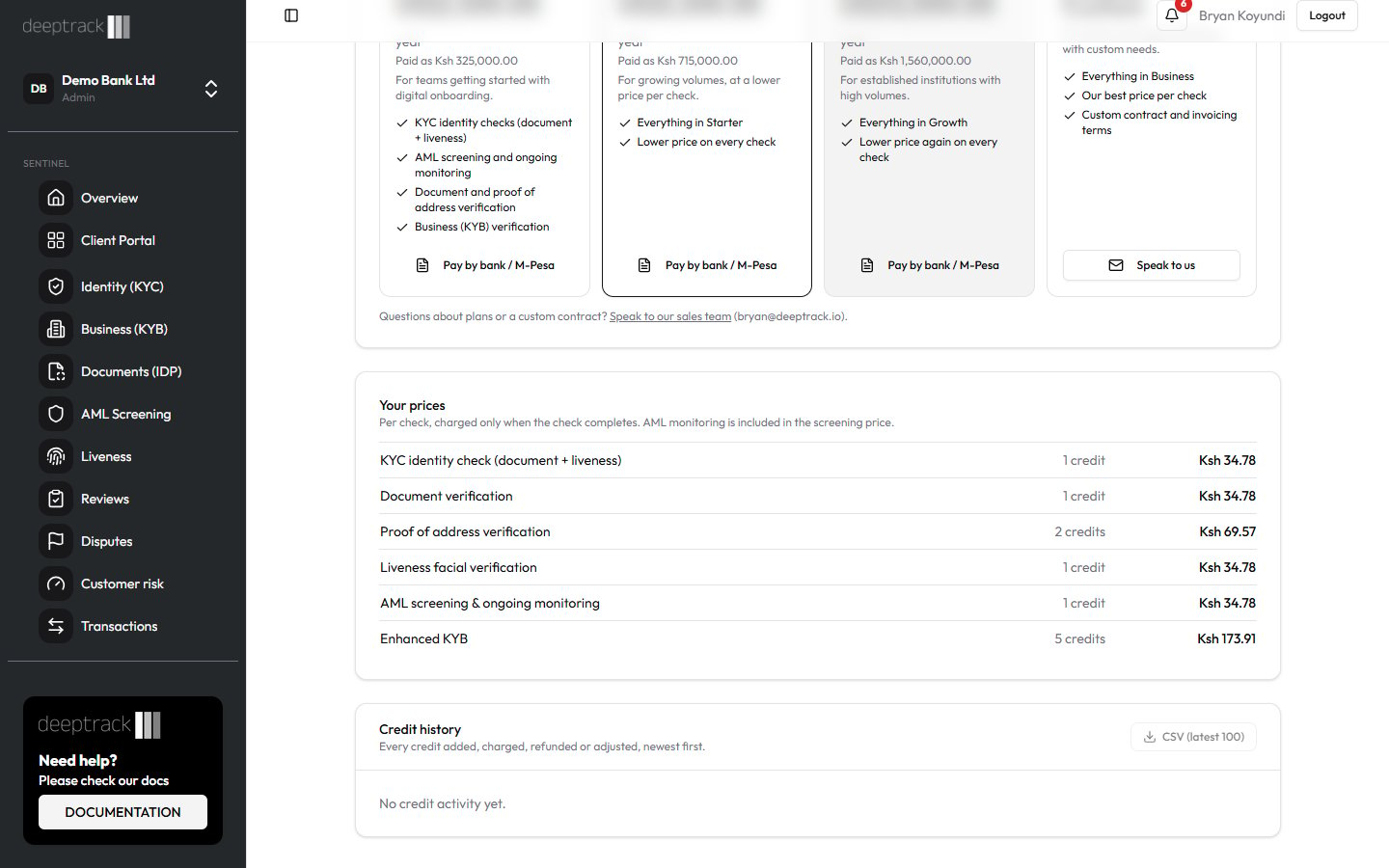
pricesfor what each kind of check costs on your plan.
curl
Node
Python
Read the credit ledger
- Call
GET /v1/credits/ledger. It takeslimit(1 to 100, default 25) andbefore, the same way as the list of checks. - Read
data, newest first. Page withnextCursoruntil it isnull.
curl
Node
Python
What each result means
A check (GET /v1/verify/{id} and each row of GET /v1/verify)
Credits (GET /v1/credits)
Ledger entries (GET /v1/credits/ledger)
Errors
401, 429 and other errors are covered in Quick start.
Common questions
When is a check charged?
When it completes. A check held for review is charged when the review is decided. A failed check isn’t charged, and each check is charged only once, even if it is retried.Do test keys use credits?
No. Checks started with a test key return a fixed sandbox result and cost nothing, so they never appear as deductions in the ledger.Why does the ledger show credits but my invoice shows money?
Sentinel counts in credits. Each ledger line also records its money value at the time it was written, so a later plan or price change never reprices history. The Billing & Credits page shows that value next to each line.Can I get a check from last year?
Yes, as long as your organization keeps it. After your retention period (7 years by default) personal data is removed, but the check still returns its id, type, verdict and dates.What happens when the balance runs out?
New checks are refused with status 402. Subscribe to thesentinel.credits.low webhook event to hear about it before then. See Webhooks and A2 Choosing a plan and paying (in Sentinel’s in-app Help).
Related guides
- Quick start
- KYC API
- Documents API
- AML and monitoring API
- Webhooks
- A2 Choosing a plan and paying (in Sentinel’s in-app Help)
- A12 Usage and reports (in Sentinel’s in-app Help)